
You already collect emails from your P1s — contest entries, website signups, the listeners who spend the most time with you. Collecting that list isn’t the same as activating it, and that’s never more true than during ratings. That’s why we’re introducing SoCast Email, a full email newsletter and campaign tool now built directly into your SoCast dashboard.
Whether you’re moving off a third-party email platform or sending your first newsletter, SoCast Email gives you a faster way to put your station in front of the people who already chose you — using tools you already know.
What’s New?
SoCast Email is built using the same page builder and content you already maintain on your website.
1. The Same Drag-and-Drop Editor You Already Use
Build campaigns with WPBakery elements — buttons, ad elements, and blog post lists — styled automatically to your station’s branding. No new editor to learn.
2. List Growth Built Right In
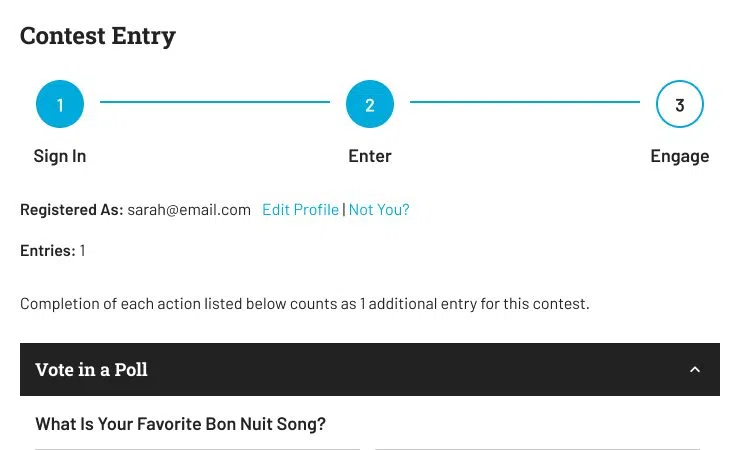
You don’t need a separate signup tool. Every contest entry can already grow your list — link a subscription group to any contest and entrants can opt in as they enter. Want a standalone signup form? Drop a Newsletter Signup element onto any page with the same page builder you use for everything else.
3. Segment Your List with Subscription Groups
Organize your audience by interest — contests, morning show, local news, concert alerts — and send the right campaign to the right group, or hand-pick recipients directly when you need to.
4. Deliverability, Handled
Sender authentication (SPF, DKIM, DMARC), automatic bounce and complaint suppression, and account-level monitoring are handled on our end, so your emails land in the inbox — not the spam folder.
5. Built-In Campaign Analytics
See opens, clicks, bounces, and unsubscribes for every campaign right in your dashboard — no separate reporting tool required.
Why This Matters for Your Station
Your P1s already live on your website, in your app, and in your contests. SoCast Email puts the inbox on that same list — one less vendor to manage, one less login to remember, and a newsletter built from the same content and branding they already recognize from your site.
And you’re never figuring it out alone — the same Account Manager who already helps you with your website, contests, and app is the one who helps you with email too. One team for everything digital, instead of a separate support line for every tool.
How to Get Started
Setting up SoCast Email requires no technical background:
- Talk to your Account Manager. They’ll confirm your account is ready and walk you through setup.
- Create your lists. Set up Subscription Groups for how you actually talk to listeners — contests, morning show, local news, concert alerts, or however your station is organized.
- Grow the list — we’ll meet you where you already collect emails. You don’t need a separate signup tool:
- Contests. Link a subscription group to any contest so entrants can opt in as they enter — the same P1s who are already filling out your forms.
- Your website. Drop a Newsletter Signup form on any page with the same page builder you use for everything else.
- A list you already have. Moving off another email platform? We can migrate your subscribers and templates. Starting from a spreadsheet? Import a CSV. Talk to your Account Manager first either way — they’ll make sure the list is permission-based and ready to send.
- Build your first campaign. Use the SoCast Page Builder to put together your first send, the same way you’d build a page on your site.
Want to see it in action? Reach out to your SoCast Account Manager or contact our support team at support@socastdigital.com to learn how to activate SoCast Email for your station today!




Comments